How to see where people stop filling your form?
"track partial form entries in WordPress"- Quora
This is a common question from website owners. For example, people start the quote form on your WordPress site and leave before they submit. You need to know who they were and how far they got before you send more visitors to that page. Google Forms only shows responses that were submitted, so the partial ones are lost and recording tools can't see inside Google's embed. With Formfacade, you can see everyone who started your form and left, with the answers they gave before they stopped. Even better, your form is part of your page with no iframe, so Hotjar or FullStory can show you each visit.
Let's start. Create your form and follow the steps below.
How to put the form on your WordPress page?
- On the page that opens, name your form, click Embed form and click Proceed. It can take about a minute.
- You will land on the form's "Share" tab, on Embed. The top bar may say "Blank Formfacade form" until you reload the page.
- After a few seconds, "Where do you want to embed this form?" will be displayed
- Select "Embed in my WordPress site" and click on the Next button
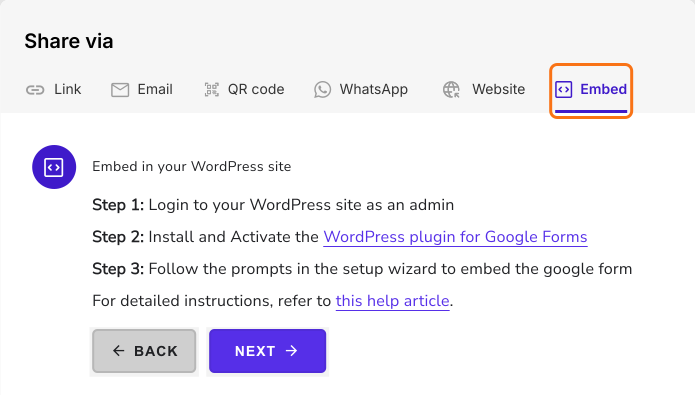
- The three steps to embed in your WordPress site will be displayed. Install the plugin and follow its setup to add the form to your page. Read How to Embed Google Forms in WordPress?
How to watch each visit?
To watch each visit, add Hotjar or FullStory to the same page, as they show you. Your form is part of your page with no iframe, so their recordings can show it.
How to see who left?
- Click on "Responses" tab
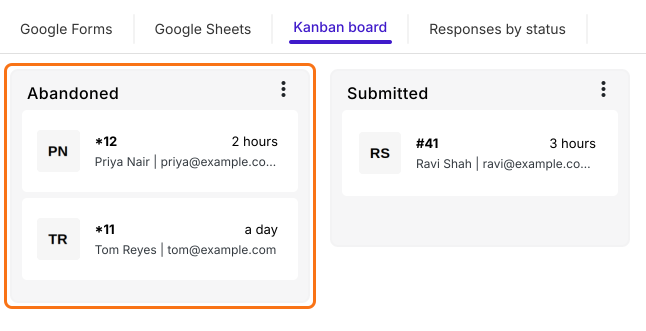
- Click Kanban board
- The Abandoned column lists everyone who started your form and didn't submit it
How to see where they stopped?
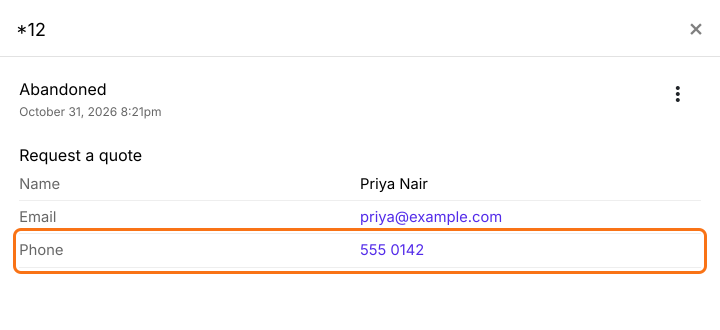
- Click a card to see the answers they gave
- Priya's last answer is Phone, so the next question on your form, Project budget, is where she stopped
Summary
If people leave your form before submitting, Google Forms shows you nothing about them. With Formfacade on your WordPress page, everyone who started appears in the Abandoned column with the answers they gave, so you can see who left and how far they got. Create your form and complete the steps above. If you have any questions, write to support.
Last updated: