Can I customize the thank you message shown after form submission?
This is a common question from Google Forms users who want to say more than "Your response has been recorded". The message people see after they submit is the last thing they read, so you may want to thank them or tell them what happens next. Google Forms lets you change this text, but it is the same for everyone and the setting is not on the form itself, so it is easy to miss. Yes, with Formfacade, you can change the confirmation message and your users will see your own words as soon as they submit. Even better, you can send people to your own thank-you page or show a different message for each answer.
Let's start. Create your form and follow the steps below.
How to change the thank you message?
- On the page that opens, name your form, click Build form and click Proceed. It can take about a minute.
- You will land on the form's "Preview" tab.
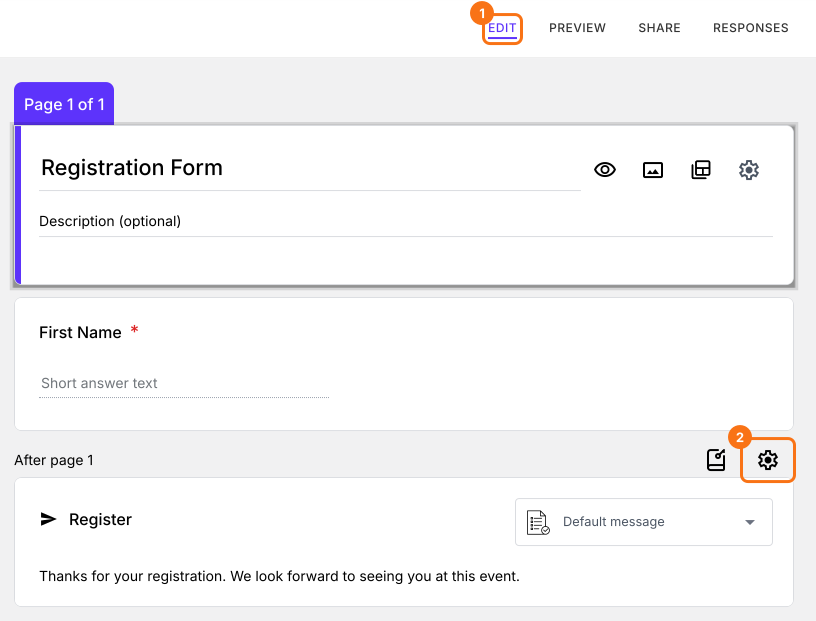
- Click on "Edit" tab

- Scroll down to the end of the form and click on the gear icon on the last "After page" row. It says "After page 1" on a form with one page. The panel can take a few seconds to open, so click once.
- If it asks "Button not configured!", click No.
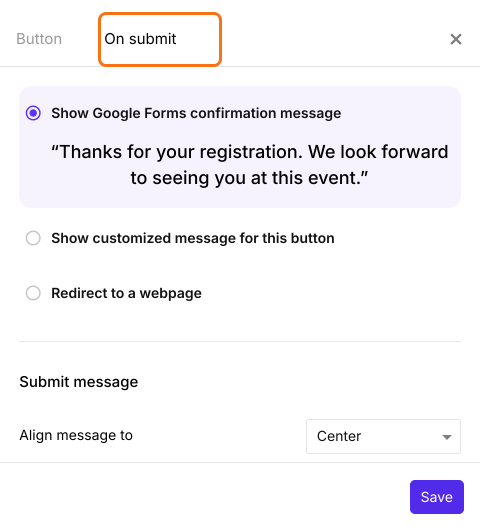
- Select the "On submit" tab
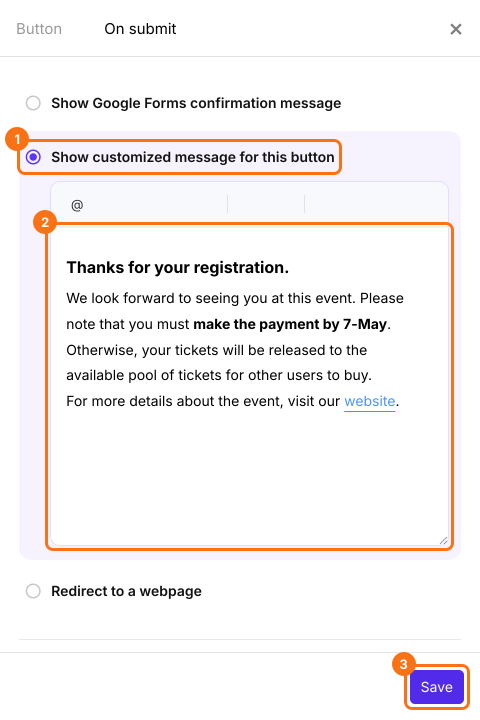
- Select "Show customized message for this button"
- Enter your message in the textbox
- Click on "Save"
People will see your message after they submit the form.
Summary
If you want to thank people or tell them what happens next, the default message may not say enough. With Formfacade, you can select Show customized message for this button, enter your message and click on Save. Create your form and complete the steps above.
Last updated: